

8K Ultra HD display technology delivers exceptional image quality for large-scale visual presentations. This article explores its key advantages and technical challenges, helping you understand its practical value, main applications, and how to choose the right display solutions for your projects.
What Is 8K Resolution?
Definition
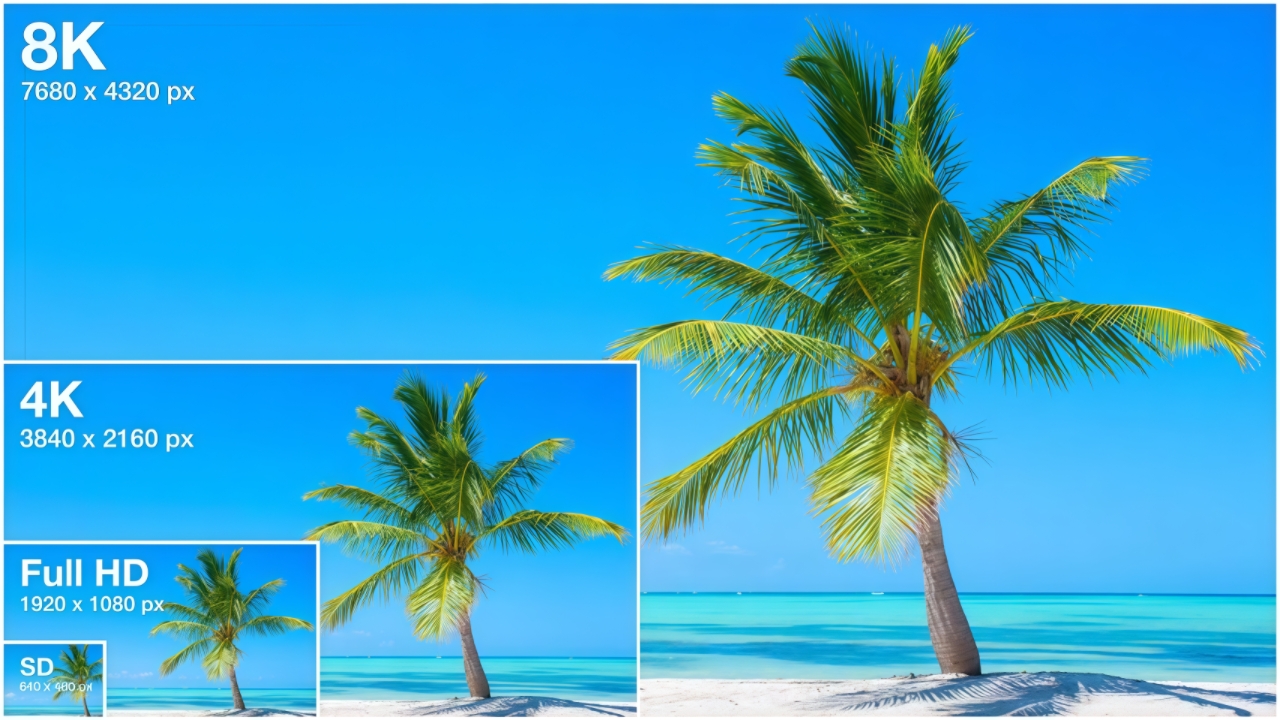
The standard resolution for 8K UHD is 7680 × 4320 pixels, with a total of approximately 33.18 million pixels. The resolution for 4K UHD is 3840 × 2160, with a total of approximately 8.29 million pixels. Simply put, 8K has four times the number of pixels as 4K and 16 times that of 1080p Full HD, allowing your screen to display much greater detail.
Key Features
8K typically uses a 16:9 aspect ratio. On screens of the same size, 8K has a higher pixel density, making it easier to display fine text, textures, and image edges. At the same viewing distance, the image is less likely to appear pixelated. For example, an 85-inch 8K screen has a pixel density of approximately 104 PPI, while a 4K screen of the same size has a pixel density of approximately 52 PPI.
What Are the Advantages of 8K Displays?
Wider Dynamic Range
8K displays, when combined with HDR technology, can present richer details in both bright and dark areas, helping to reduce overexposure in highlights and loss of detail in shadows. It’s important to note that 8K represents higher spatial resolution, while HDR is responsible for expanding brightness and color expression.
Only when these two technologies are combined, and the display, playback device, and content all support HDR,can your screen simultaneously present richer levels of brightness and darkness.
Fine Image Display
For the same screen size, 8K offers a finer pixel structure, making it ideal for displaying detailed charts, product details, and more. For a 75-inch screen, 8K has a pixel density of approximately 117 PPI, while 4K is approximately 59 PPI. On large displays or when viewed up close, 8K helps reduce the visible pixelation, making the edges and details of your device’s images appear smoother.
Flexible Image Editing
With approximately 33.18 million pixels, 8K images provide greater flexibility for post-processing tasks such as cropping, zooming in on specific areas, and multi-area content layout. For example, you can crop a full 4K image from a single 8K image, or extract different sections for your product close-ups, detail comparisons, or multi-area displays.
However, the smaller the cropped area, the fewer pixels remain, so the quality of the zoomed-in image will still depend on the quality of your device’s original source material.
Challenges Facing 8K
Lack of Native 8K Content
Currently, common video footage is still primarily in 1080p and 4K, with relatively little native 8K content available. To take full advantage of an 8K screen, the video itself must contain sufficient detail. If your digital signage project primarily plays standard advertising videos or web content, the lack of native 8K footage may prevent you from fully utilizing the capabilities of your high-resolution screen.
High Bandwidth and Storage Requirements
Since 8K video contains four times the number of pixels as 4K, video transmission and processing typically require higher bandwidth. Taking online video playback as an example, 50–100 Mbps can serve as a reference bandwidth range for some high-quality 8K streams, but not all 8K videos use the same bitrate.
Some videos with higher compression efficiency require lower bandwidth, while high-frame-rate, low-compression videos may require hundreds of Mbps or even more.
If network bandwidth is insufficient, your digital signage may experience buffering, reduced image quality, or playback interruptions. 8K video files are also typically larger. For example, a 10-minute video with an average bitrate of 100 Mbps would have a file size of approximately 7.5 GB.
If your device needs to store multiple advertising clips for extended loop playback, it is recommended to plan storage capacity in advance to avoid frequent cleanup or replacement of storage devices later on.
Higher Hardware Costs
The manufacturing cost of 8K display devices is generally higher than that of 4K products of the same size and configuration, primarily due to high-pixel-density panels, display driver circuits, signal interfaces, and thermal management designs.
When planning large-format commercial display projects, in addition to the screen itself, you’ll need to include media players, video processing equipment, and storage space in your overall budget.
At the same time, 8K playback places higher demands on graphics processors and video decoding hardware. Taking 8K@60Hz as an example, the device must process approximately 1.99 billion pixel positions per second.
If the media player does not support the corresponding video formats, stuttering may occur, or the system may even slow down. If your device also needs to run dynamic ads or support multi-screen output simultaneously, it is even more important to confirm in advance whether your hardware is sufficient.

Application Scenarios for 8K Screens in Digital Signage
If your project places particular emphasis on image detail, display quality, or the viewing experience at close range, 8K screens are worth considering as part of your solution evaluation.
In large commercial complexes, 8K displays can render the finest details in advertising visuals. In corporate exhibition halls, museums, and immersive exhibition spaces, large-format 8K screens can display industrial models, works of art, and other content while minimizing detail loss when images are zoomed in.
Additionally, in control rooms, professional visualization centers, and similar settings, 8K screens can accommodate more charts, video windows, and high-resolution data content.
However, if a project primarily involves digital signage featuring standard promotional messages and general advertising videos, 4K typically provides sufficient clarity.The advantages of 8K are most evident in ultra-large displays and high-precision visual presentations.
8K vs. 4K Comparison
Resolution
The standard resolution for 4K UHD is 3840 × 2160 pixels, with a total of approximately 8.29 million pixels. The commonly used DCI 4K resolution is 4096 × 2160 pixels, with a total of approximately 8.85 million pixels.
4K is capable of rendering clear text, product details, and high-definition images, making it suitable for your commercial advertising screens, conference displays, and digital signage.
8K
The standard resolution for 8K UHD is 7680 × 4320 pixels, with a total of approximately 33.18 million pixels, four times that of 4K UHD and 16 times that of 1080p Full HD.
The higher pixel density allows for the display of fine text and complex textures, making it suitable for your extra-large displays, immersive exhibition halls, and close-up viewing scenarios.
It is important to note that while a screen may have 8K resolution, this does not mean all content will achieve native 8K picture quality. Video sources and decoding devices must also support the corresponding specifications.
Frame Rate
4K
Common frame rates for 4K video include 24, 25, 30, 50, and 60 fps. 24 fps is commonly used in films, 30 fps is typical for online videos, while 50/60 fps are better suited for sports events, dynamic advertisements, and fast-moving scenes.
At 60 fps, 60 frames are displayed per second, providing more detailed motion information compared to 30 fps.
8K
8K video can also be recorded at 24, 30, or 60 fps; 8K does not necessarily mean support for 120 fps. 8K@60Hz requires processing approximately 1.99 billion pixel positions per second, which is four times that of 4K@60Hz.
Therefore, if your project requires playback of high-resolution, high-frame-rate content, be sure to verify that the player, interface, and display all support the target specifications.
Audio Channels
4K
4K refers to image resolution and does not specify the number of audio channels. 4K video can be paired with stereo, 5.1-channel, or 7.1-channel audio. A 5.1-channel setup typically includes front left, center, and right channels, two surround channels, and a low-frequency effects channel, suitable for your common multimedia playback environments.
8K
8K video can also be paired with 5.1, 7.1, or more complex audio systems. 22.2-channel is a multichannel format used in professional ultra-high-definition systems. It is not a standard configuration for all your 8K devices.
The actual listening experience also depends on the audio source, speaker placement, and audio processing capabilities, so you cannot judge a device’s sound quality based solely on its 8K resolution.
Viewing Distance
4K
Viewing distance affects the human eye’s ability to distinguish individual pixels: taking a 55-inch, 16:9 4K screen as an example, the screen height is approximately 68.5 cm. When viewed from a distance of about 1.0 meter, the details are already quite clear.
8K
Using the same 55-inch, 16:9 screen as an example, 8K has a pixel pitch of approximately 0.159 mm. For 4K, it is about 0.317 mm. This means 8K has half the pixel pitch of 4K.
At the same viewing distance, 8K is less likely to show visible pixels. It is better suited for displaying fine details at close range.
Video Enhancement
4K
If your existing footage is 1080p or lower, you can use AI video enhancement tools to improve image quality. These tools support upscaling, noise reduction, and edge restoration. For example, upscaling a 1920 × 1080 video to 3840 × 2160 produces four times as many pixels.
However, adding pixels does not necessarily restore all the original details. For standard digital signage and commercial advertisements, high-quality 4K footage typically delivers satisfactory results.
8K
Upscaling a 1080p video to 8K increases the pixel count by 16 times. However, this does not mean the image quality is 16 times better. If your project uses an 8K screen, prioritize native 8K footage. This lets you make full use of the screen’s capabilities.
If suitable 8K content is not available, high-quality 4K footage is a practical alternative. You can enhance it moderately to improve the viewing experience.
Why Is the Use of 8K Limited?
Excessive Bandwidth Requirements
8K video generates a massive amount of data, placing significant strain on video encoding, network transmission, and interface output. Taking uncompressed video at 60 fps, with 10-bit color depth and RGB 4:4:4, as an example, the active video data alone reaches approximately 71.7 Gbps.
For digital signage projects, the 8K playback chain must support this data rate. The decoder must handle the video format, and the HDMI or DisplayPort interface must meet the required specifications. Otherwise, playback may stutter, frames may drop, or the display may fail to output the target resolution.
High Storage Requirements
8K video contains a large amount of pixel data, and prolonged playback can rapidly increase your storage requirements.
At a bitrate of 100 Mbps, for example, video occupies approximately 750 MB per minute and about 45 GB per hour. At a bitrate of 200 Mbps, it occupies approximately 90 GB per hour. If your digital signage plays video for 8 hours a day, at a bitrate of 100 Mbps, it will consume approximately 360 GB of video data daily.
If your device needs to store a large number of video files, we recommend verifying in advance that you have sufficient storage capacity.
Insufficient Basic Device Performance
Standard 4K playback devices typically cannot directly process full 8K video. Take interfaces as an example: HDMI 2.0 has a maximum bandwidth of 18 Gbps, while HDMI 2.1 supports up to 48 Gbps, providing you more bandwidth for 8K@60Hz transmission.
In other words, simply replacing the screen with an 8K model is usually not enough. You also need to verify that the player, decoding chip, interfaces, and cables are compatible to avoid issues such as a black screen, frame rate drops, or failure to output properly.
Hardware Costs
8K playback needs a more powerful processor, faster storage, and compatible interfaces. As a result, 8K solutions usually cost more than 4K solutions. If the player lacks 8K hardware decoding, adding more memory or upgrading the software will not fix the issue.
For multi-screen tiling, your system also needs more output channels and graphics processing power. These requirements will further increase equipment and system integration costs.
Development Trends in 8K Display Technology
8K resolution represents a key direction in the development of ultra-high-definition display technology. However, 8K technology currently faces challenges such as limited content availability, high equipment costs, and significant transmission bandwidth requirements.
For most standard digital signage projects, 4K is still enough to meet basic display needs. 8K is better for high-end or professional use cases that require precise image details.
In the future, AI-powered image upscaling and better video compression may speed up 8K adoption. Lower panel manufacturing costs and more professional display applications may also drive its wider use.
As native 8K content increases, playback hardware upgrades, and panel costs decrease, the scope of 8K applications is expected to expand. However, in the short term, 8K will continue to be dominated by the high-end and professional markets.
Conclusion
With 33.18 million pixels, 8K delivers finer visuals for extra-large digital signage, brand displays, and professional applications. With 18+ years of commercial display manufacturing experience, Beten provides OEM/ODM customization and quality control to support you smooth project implementation.
FAQs
Q1:Is a higher refresh rate always better for 8K displays?
No. High refresh rates are suitable for dynamic content such as fast-moving animations, but they increase signal bandwidth requirements and processor load. Standard advertising videos are typically played at 30 or 60 fps, and a 60 Hz screen generally meets common needs.
If you need to play high-frame-rate content, please confirm that the signal source, interface, and screen all support the corresponding specifications.
Q2:Are there resolutions higher than 8K?
Yes. The standard 16K UHD resolution is typically 15,360 × 8,640, which is four times the number of pixels in 8K. Higher resolutions are suitable for ultra-large video walls and professional visualization, but they also place higher demands on players, transmission links, and native source material.
Q3:What interfaces are required to support 8K?
Common interfaces include HDMI 2.1 and DisplayPort 1.4/2.1, but the ability to output 8K also depends on the refresh rate, color depth, and color format. For example, 8K at 60 Hz typically requires HDMI 2.1 or a compatible solution using DSC compression.
We recommend carefully checking the interface specifications of both the media player and the display to avoid discovering after purchase that the target resolution or refresh rate cannot be achieved.
Q4:Can 8K content be played on a 4K display?
Yes, but the player must support the 8K video’s decoding format and bitrate. It must also scale the image down to 3840 × 2160 for output. The final image will still be displayed at 4K resolution. It will not show all the detail of the 8K pixels. If you plan to play content this way, we recommend first confirming the player’s decoding specifications and actual compatibility.
Q5:What factors typically affect the power consumption of 8K devices?
It is primarily determined by screen size, backlight brightness, and the power consumption of the playback device. A device rated at 500W consumes approximately 180 kWh if it runs for 12 hours a day over 30 days.
For large-scale projects, use the rated power to estimate power supply needs and electricity costs. Then, refer to the device’s measured operating power to calculate actual energy consumption.


